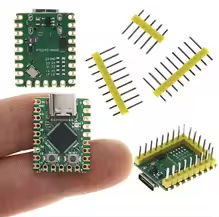
Raspberry Pi Zero Single-Board Computer
Ultra-Compact Linux Computer for IoT and Embedded Projects
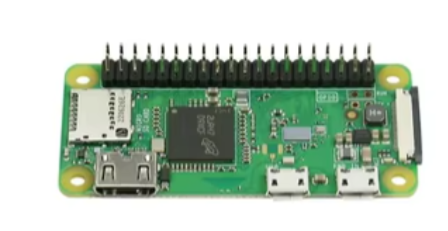
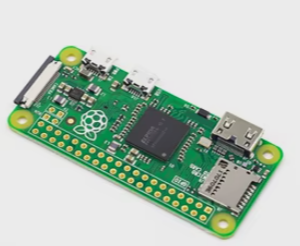
The Raspberry Pi Zero is an ultracompact, lowcost single-board computer designed for projects where space is limited, such as drones, robots, and handheld devices [citation:1]. Its miniature footprint, approximately the size of a stick of gum, makes it ideal for embedded applications [citation:1].
UltraCompact Design Fits into space-constrained projects
Runs Full Operating System Supports Raspberry Pi OS and Linuxbased applications [citation:1]
Requires a microSD card with Raspberry Pi OS installed, 5V micro USB power supply, and mini HDMI cable for display [citation:2]
Uses a micro USB OTG port for connecting peripherals like keyboards and mouse [citation:3]
The 40-pin GPIO header is unpopulated and typically requires soldering for use [citation:3]
Technical Specifications
| Parameter | Value |
|---|
| Processor | 1GHz single-core ARM11 (BCM2835) |
| Memory | 512MB RAM |
| Connectivity | No builtin wireless (Zero W adds 2.4GHz WiFi & Bluetooth) [citation:2] |
| Video Output | Mini HDMI port (1080p support) [citation:4] |
| USB Ports | 1x micro USB OTG + 1x micro USB power |
| GPIO | 40pin HATcompatible header (unpopulated) [citation:2] |
| Camera | CSI-2 connector (v1.3 models) [citation:7] |
| Dimensions | 65mm x 30mm [citation:1] |
| Weight | 9g [citation:1] |
= Key Features =
Fully Functional Linux Computer - Can run a full operating system and applications [citation:1]
Power Efficient As low as 100mW, suitable for batterypowered remote projects [citation:1]
Wide Compatibility - Works with the same HATs as larger Raspberry Pi models [citation:1]
= Applications =
- Small robots and drones [citation:1]
- Handheld gaming consoles [citation:1]
- Remote wildlife cameras and weather stations [citation:1]
- IoT and smart home devices [citation:1]
- Network ad blockers and VPNs [citation:1]
Ideal for Headless Projects Commonly used without a monitor via SSH over WiFi on wireless models [citation:1]
Popular and Affordable One of the most costeffective full Linux computers available [citation:2]
√ Runs standard Raspberry Pi OS and Linux-based tools
√ Drop-in compatible with many existing accessories [citation:3]
√ Small size enables projects not possible with larger boards
Troubleshooting
No video output:
- Ensure microSD card has properly installed Raspberry Pi OS
- Use a mini HDMI to HDMI adapter or cable [citation:2]
Board not booting:
- Check the microSD card is properly inserted and has a valid OS image
- Verify power supply provides 5V and adequate current
Wi-Fi not available (Zero W model):
- Ensure country code is set in Raspberry Pi OS configuration [citation:2]
- Confirm using 2.4GHz network (not 5GHz) [citation:3]