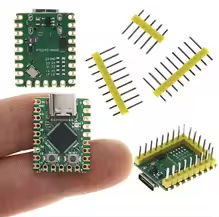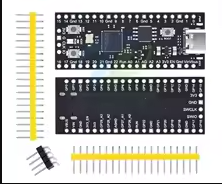
Pico2 RP2350 Development Board TYPE-C USB RP2350A 16MB Microcontroller Compatible With Raspberry Pi PICO 2 – KSH 1,300 at HIMASTORES Mombasa – best electronics in Kenya

Pico2 RP2350 Development Board TYPE-C USB RP2350A 16MB Microcontroller Compatible With Raspberry Pi PICO 2

SKU: HMJ696 Category: Microcontrollers
KSH 1,300.00
Out of Stock

Product Description

Pico2 RP2350 Development Board with USB-C and 16MB Flash

HighPerformance DualArchitecture RP2350 Development Board

This Pico2compatible board is powered by the RP2350A microcontroller, featuring a dualcore ARM CortexM33 and dualcore Hazard3 RISCV processor, with a flexible clock running up to 150MHz [citation:2][citation:6]. It comes with 16MB of onboard Flash memory and a modern USBC port, delivering significantly enhanced performance over the original Pico [citation:5][citation:6].

RP2350 DualCore Architecture Selectable ARM CortexM33 and RISCV Hazard3 cores at 150MHz [citation:2]
16MB Flash & 520KB SRAM - Ample memory for complex firmware and MicroPython applications [citation:2][citation:5]
Operating voltage is 1.8V to 5.5V - compatible with various power sources [citation:5]
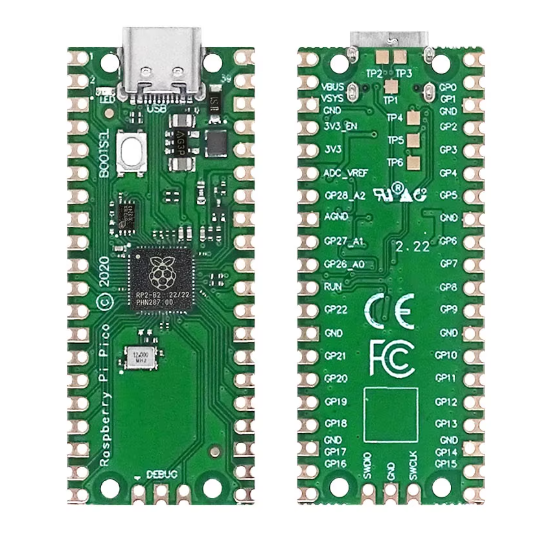
Press and hold the BOOTSEL button while connecting USBC for dragand-drop UF2 programming [citation:6]
GPIO pins are 3.3V logic level - use level shifters for 5V devices

Technical Specifications

ParameterValue
ProcessorRP2350A Dual-Core [citation:2]
Core OptionsARM CortexM33 or RISCV Hazard3 [citation:6]
Clock SpeedUp to 150MHz [citation:2]
Flash Memory16MB QSPI [citation:5]
SRAM520KB [citation:2]
PIO State Machines12 (3 blocks) [citation:2]
PWM Channels24 [citation:2]
ADC Channels4 x 12-bit [citation:2]
USBUSB-C 1.1 Host/Device [citation:5]
Interfaces2x UART, 2x SPI, 2x I2C [citation:2]

= Key Features =

RP2350 High Performance - 150MHz processing with optional secure boot [citation:3][citation:6]

USBC Connector Reversible and easier to plug in [citation:5]

16MB Onboard Flash - Quad SPI Flash for extensive storage [citation:5]

PIO & Peripherals - 12 PIO state machines for custom interfaces [citation:6]

Low Power Modes Sleep and dormant modes for batterypowered projects [citation:2]

= Applications =

  1. Advanced robotics and motor control [citation:5]
  2. IoT and portable electronics with USB-C power [citation:5]
  3. Audio processing and machine learning [citation:5]
  4. MicroPython and CircuitPython development [citation:5]
  5. Custom peripheral development with PIO
Significant Performance Bump - Faster M33 cores vs original Pico's M0+ [citation:3]
Rich Peripheral Set 12 PIO, 24 PWM, and HSTX for highspeed data [citation:2][citation:6]

√ Software-compatible with Raspberry Pi Pico 2 [citation:5]

√ Draganddrop UF2 programming via USB mass storage [citation:6]

√ 16MB Flash for data logging and complex applications [citation:5]

Connection Guide

  • USBC: Power and programming (datacapable cable required) [citation:5]
  • BOOTSEL Button: Hold while connecting USB for bootloader mode [citation:6]
  • 26 GPIO pins with 4 ADC channels, 2 UART, 2 SPI, 2 I2C [citation:2]
  • SWD interface for debugging with Raspberry Pi Debug Probe [citation:9]
Use BOOTSEL + reset for UF2 draganddrop programming
For 5V systems, power via USB-C or VS pin
Do not apply 5V to GPIO pins
Avoid using damaged or chargeonly USBC cables

Troubleshooting

Bootloader not mounting:

  • Press and hold BOOTSEL button while connecting USB-C
  • Use a datacapable USBC cable
  • Avoid using a USB hub

Firmware upload issues:
  • Ensure board is in bootloader mode (BOOTSEL + USB)
  • Copy UF2 file to mounted drive
  • Wait for auto-reset after upload