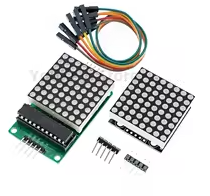
MAX7219 8*8 Dot Matrix Module Red Light Microcontroller Module Display Module MCU LED Display Control Module For Arduino 5V
KSH 350.00
In Stock
This MAX7219 8x8 dot matrix module features a red LED display controlled by the MAX7219 driver IC. It allows easy interface with microcontrollers like Arduino, ESP32, and Raspberry Pi to create custom text, graphics, and animations.
| Parameter | Value |
|---|---|
| Driver IC | MAX7219 |
| Matrix Size | 8x8 (64 LEDs) |
| LED Color | Red |
| Supply Voltage | 5V DC |
| Logic Voltage | 3.3V to 5V |
| Interface | SPI (DIN, CS, CLK) |
| Display Control | Individual LED brightness control |
= Key Features =
Individual LED Control - Each of 64 LEDs independently controlled
Cascade Capability Supports daisychaining multiple modules
16Level Brightness Control Adjustable via software
Hardware Decoding - ASCII character support
Simple Wiring - Only 4 pins needed (VCC, GND, DIN, CS, CLK)
√ Pre-assembled with pin headers
√ Red LEDs for high visibility
√ Ready for breadboard and PCB
To Arduino:
Install the MD_MAX72XX or LedControl library via Arduino IDE:
Basic setup:
Easy Library Support - Plenty of examples available
Graphic Control - Draw any pattern on the 8x8 grid
√ Includes library examples
√ Supports hardware SPI or software SPI
√ Display individual pixels
No display or wrong patterns:
Scrolling text issues: