ISD1820 Voice Recording and Playback Module
Complete Voice Board with Microphone and Loudspeaker
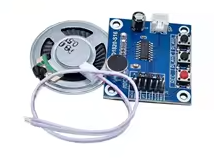
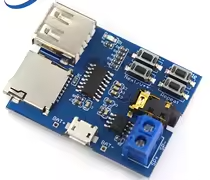
The ISD1820 is a voice recording and playback module that offers a simple way to add 10 seconds of audio to your projects. It comes with a built-in microphone and an 8Ω 0.5W speaker, allowing for standalone operation without a microcontroller[citation:2][citation:5].
Simple Recording Solution Record and play back messages with builtin microphone and speaker
Easy Integration - Can be used standalone with buttons or with an Arduino for automated playback
Operating voltage is DC 3V to 5V for the board[citation:2][citation:9]
For automated playback, connect the PLAY pin to a microcontroller pin
The recorded message is retained even without power, thanks to the onchip nonvolatile memory[citation:9]
Technical Specifications
| Parameter | Value |
|---|
| Recording Time | 10 seconds (default, can be adjusted)[citation:2][citation:9] |
| Operating Voltage | DC 3V to 5V[citation:2][citation:9] |
| Working Current | 60mA[citation:2] |
| Speaker Output | 8Ω 0.5W (included)[citation:2][citation:9] |
| Repeat Recording | 100,000 times[citation:6] |
| Dimensions | 54 x 38 x 16mm[citation:2] |
= Module Features =
Multiple Playback Modes Supports loop, jog, and singlepass playback via DIP switches[citation:10]
Onboard Microphone Builtin electret mic for direct recording[citation:9]
Simple Button Control REC, PLAYE, and PLAY-L buttons for manual operation[citation:10]
NonVolatile Storage Retains recordings even when power is removed[citation:9]
= Applications =
- Voice prompts and alerts in embedded systems[citation:4]
- Interactive toys and games[citation:4]
- Security systems with audio notifications[citation:4]
- Message repeaters and announcements[citation:9]
- Educational audio projects[citation:4]
Versatile Project Component - Works as a standalone megaphone module or as part of a larger system
Easy to Use - Record with one button, play with another
√ Includes microphone and 8Ω 0.5W speaker
√ Can be controlled by buttons or microcontroller
√ Compact size for easy integration
Connection and Operation Guide
*Pinout*:
- REC: Active HIGH record signal (hold HIGH to record)[citation:7]
- PLAYE: Edgeactivated playback (starts on HIGH transition)[citation:7]
- PLAYL: Levelactivated playback (play while HIGH)[citation:7]
- FT: FeedThrough mode (microphone directly drives speaker)[citation:7]
- SP+ / SP-: Speaker output terminals (8Ω impedance)[citation:7]
*Basic Operation*:
- Press and hold the REC button to record (10 seconds max)[citation:2]
- Press PLAYL for levelactivated playback
- Press PLAYE for edgeactivated playback
- Use DIP switches to set loop or single-pass playback modes[citation:10]
For loop playback, link the P-E pins on the board[citation:12]
For microcontroller control, connect the REC and PLAY pins to digital outputs[citation:6]
Do not exceed 5V power supply
The module is not designed for high-fidelity audio—some background noise is normal[citation:5]
Troubleshooting
No sound playback:
- Verify power supply is 3V-5V and correctly connected
- Check speaker connection to SP+ and SP- terminals
- Ensure a message has been recorded
Poor recording quality:
- Speak directly into the onboard microphone
- Minimize background noise during recording
- Consider that 10-second time frame yields moderate fidelity due to sampling rate[citation:6]